Conference Room AV: How Atlanta Businesses Are Upgrading Their Meeting Spaces
Your conference room is your brand. It's where you present to clients, conduct executive meetings, and collaborate with your team. A room with tangled HDMI cables on the table, a TV that needs three remotes to operate, and a video call that takes four minutes to connect tells a story — and it's not a flattering one.
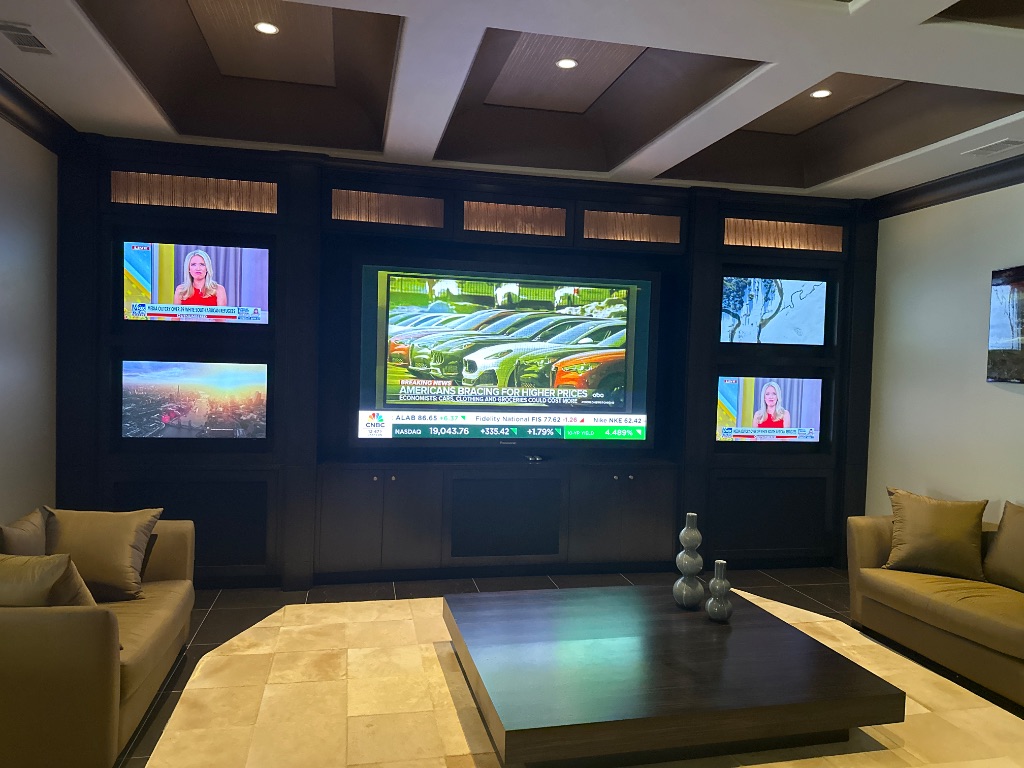
More Atlanta businesses are recognizing what hospitality and corporate clients have always known: the technology in your meeting space reflects your organization's standards. A professionally designed conference room AV system isn't just a convenience — it's a statement of operational excellence and attention to detail.
DLSAV has designed and installed conference rooms, boardrooms, executive suites, and multi-purpose meeting facilities for Atlanta businesses across industries. Here's what goes into getting it right.
The one-minute rule: A conference room system should be fully operational — display on, source connected, video conference running — in under 60 seconds, operated by anyone in the room with no training. If it takes longer or requires IT support, the system needs a redesign.
The Core Components of a Professional Meeting Room
Every conference room AV system, regardless of size or budget, shares the same functional requirements: display, audio, video conferencing, source switching, and control. The difference between a budget install and a professional one is how well each component is specified, integrated, and programmed for the room it lives in.
Display — Size and Brightness for the Room
The display needs to be large enough for everyone in the room to read presentation content clearly from the farthest seat. A common mistake is installing too small a display in a large room — forcing attendees to lean in or squint at slides. The industry standard guidance is roughly 1 inch of diagonal display per foot of viewing distance. A 20-foot conference room needs a minimum 75–85" display; ideally 98"+ or a projection system.
For larger spaces — executive boardrooms, training rooms, auditoriums — video walls built from commercial display tiles deliver scalable, seamless large-format presentation surfaces that create an impression no single large panel can match. DLSAV has installed video walls from 2×2 configurations through custom multi-row setups for clients with demanding presentation requirements.
Audio — Conference Call Clarity
Poor audio quality on conference calls is the single most common complaint in modern workplaces. Voices dropping out, echo, background noise, and participants asking each other to repeat themselves — these are symptoms of inadequate microphone and speaker design, not bandwidth problems. A professional conference room audio system uses ceiling-mounted microphone arrays, room-appropriate speaker placement, and acoustic echo cancellation processing to deliver call quality that sounds like everyone is in the same room.
Video Conferencing Integration
Modern conference rooms need to support Teams, Zoom, Google Meet, and Webex — often all at once depending on which client or partner is being called. Professional video conferencing bars from manufacturers like Logitech, Poly, or Neat integrate camera, microphone, and speaker in a single unit, certified for the major platforms, with features like auto-framing and speaker tracking that make remote participants feel present rather than peripheral.
Crestron — The Standard for Commercial AV Control
In commercial environments, Crestron is the industry standard for AV control. It's in every major hotel boardroom, corporate campus, and government facility in the world — not by coincidence, but because it works reliably at a level that consumer alternatives cannot match.
One-Touch Meeting Start
A Crestron touch panel on the conference table or mounted beside the room's display gives every user a consistent, intuitive interface. "Start a Meeting" powers up the display, connects to the room calendar to detect which video platform is needed, adjusts room lighting and shading to presentation mode, and routes the right sources — all automatically. The user experience is so simple that you never have to "help someone figure it out" again.
Room Scheduling and Occupancy
Crestron integrates with Microsoft Exchange and Google Workspace to display room availability and upcoming meetings on the touchscreen outside the door. Occupancy sensors detect when a scheduled meeting ends early and automatically release the room — no more ghost meetings blocking your calendar. When a room is vacant, the system powers down automatically after a configurable timeout, saving energy and extending equipment life.
Multi-Room and Campus Control
For clients with multiple conference rooms across a building or campus, Crestron enables centralized monitoring and management. An IT or facilities manager can see every room's AV status from a single dashboard — which rooms are in use, which displays are on, whether any system is reporting an error. Remote management eliminates costly truck rolls for simple issues.
Wireless Presentation — No More Dongles
The HDMI cable on the conference table is going away. Wireless presentation systems like Crestron AirMedia and Barco ClickShare allow any device — Windows, Mac, iOS, Android — to share content on the room display without wires, adapters, or drivers. Guests can present from their own laptops the moment they sit down, without IT intervention or hunting for the right adapter in the cable drawer.
For organizations with a mix of Crestron-controlled rooms and simpler spaces, wireless presentation systems can be deployed independently as a standalone upgrade — immediately improving every meeting in rooms that currently rely on cables.
Designing for Different Room Sizes
Not every meeting space needs the same solution. DLSAV designs systems appropriate for the room type — from quick-collaboration huddle rooms to formal executive boardrooms.
Huddle Rooms (2–4 people)
Small collaboration spaces need simplicity above all. A 65–75" display with an integrated video bar, wireless presentation capability, and a simple two-button control panel covers 90% of use cases. These rooms see constant, varied use — the system needs to be simple enough that anyone uses it without hesitation.
Standard Conference Rooms (8–12 people)
The workhorse of any office. Needs a larger display or dual-screen setup, proper ceiling microphone coverage for the full table length, and a Crestron touch panel for room management. Wireless presentation for multiple simultaneous presenters.
Executive Boardrooms (12–20+ people)
The showpiece. A boardroom should reflect the company's standards at the highest level. Large-format displays or video walls, custom millwork integration for technology, concealed cabling, premium audio processing, Crestron control with room-tailored programming, motorized shading and lighting integration. This is a room where every detail is intentional.
The hidden cost of cheap AV: A poorly specified conference room system costs more in IT support calls, wasted meeting time, and reputation damage than it saves in installation cost. A professionally designed Crestron-controlled room pays for itself in productivity and professionalism within the first year.